

Download and Install your Note Designer® Workspace
Workspace:
The tool that allows you to save drafts while you work on your notes.
Downloading and installing Workspace should take only a few minutes. Let’s get started.

Step 1 — Download the Installer
- Click either Download for Windows, or Download for Mac, below.
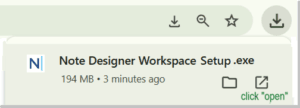
- Once the file finishes downloading:
- Click Open or Run in your browser, or
- Open your Downloads folder and double-click the file

Step 2 — Install the App
- On Windows
- An installation “wizard” will guide you through the steps.
- You may see a security prompt asking:
- “Do you want to allow this app to make changes to your device?“
- Click Yes to continue. This is normal.
- The app will install and open automatically.
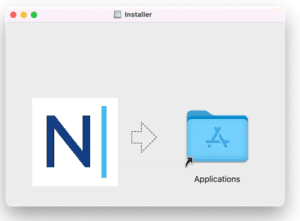
- On Mac
- A window will appear with the ND icon and your Applications folder.
- Drag ND into Applications, then open it from there.

Step 3 — Launch the App
- The app should open automatically after installation.
- If it doesn’t:
- Windows: Open it from the Start menu
- Mac: Open it from the Applications folder
Ready to simplify your documentation?
Join thousands of mental health professionals who trust Note Designer® to save time, reduce stress, and stay in control of their workflow.
Start your free demo